
FAQ
Quick answers to the questions that come up most. If yours isn’t here, reach out via Community & Support.
What is HOTAS?
Section titled “What is HOTAS?”HOTAS stands for Hands On Throttle And Stick — a control system layout where the throttle and joystick carry every button, switch and axis you need so you don’t have to take your hands off the primary controls. Standard in fighter jets and modern flight sims.
In the RC and sim world, “HOTAS” usually means a separate joystick + throttle combo, often with a third unit for rudder pedals. Magic Box is built to drive RC models with exactly this kind of gear.
Why is my axis reversed?
Section titled “Why is my axis reversed?”Open the channel in the Web UI’s Channels screen and toggle Reverse. Live preview confirms the direction immediately.
Can I power Magic Box from a USB port?
Section titled “Can I power Magic Box from a USB port?”Almost never enough current. Magic Box wants a 3–6S LiPo via XT60. USB might give enough for a single small joystick on the bench, but full HOTAS rigs (joystick + throttle + pedals + Bluetooth head tracker) need real power.
Do you support CRSF?
Section titled “Do you support CRSF?”Yes — through any ExpressLRS or TBS Crossfire TX module on Magic Box v2.0. On v1.4 the path is ExpressLRS only (Bandit Micro / Lite / Nano on ELRS 3.x+, with UART inverted ticked in the module’s WebUI — TBS Crossfire-family modules don’t expose that toggle, so they’re not supported on v1.4). For v1.4 the simplest path stays SBUS.
This is a hardware question, not a firmware one — one firmware image covers both boards, but only v2.0 switches UART inversion per protocol:
| Hardware | PPM | SBUS | IBUS | CRSF (via TX module) |
|---|---|---|---|---|
| v2.0 | ✅ | ✅ | ✅ | ✅ any module (ExpressLRS or TBS Crossfire) |
| v1.4 | ✅ | ✅ | ⚠️ only with a module that accepts an inverted line — in practice, use SBUS | ⚠️ ExpressLRS only — Bandit Micro / Lite / Nano on ELRS 3.x+, with UART inverted checked in the module’s WebUI |
Not sure which board you have? Hardware v1.4 vs v2.0 tells you how to check.
Sticks (CH1-4, AETR) ride at full precision in any ELRS / Crossfire mode. Aux channels CH5-16 are quantized by the air protocol — that’s an RF design choice (see the next entry), not a Magic Box limit. See Output Signals for wiring.
On ELRS, why don’t my aux channels show smooth values?
Section titled “On ELRS, why don’t my aux channels show smooth values?”ExpressLRS’s air protocol packs the channels more densely than wired CRSF to fit RF bandwidth. The sticks (CH1–4, AETR) ride at full 10-bit resolution, but aux channels CH5–16 get quantized: in the default “Hybrid switches” mode the higher channels are encoded as 1–3 bit switches (2 or 8 positions). The wider “Wide” mode raises that to ~7 bits per channel (~128 positions) but still less than full CRSF.
That’s an ELRS RF design choice, baked in, not a Magic Box limitation. To switch to “Wide” mode and configure packet rate / TX power, you need a radio with EdgeTX and the ExpressLRS Lua script — those settings live in the module’s per-model config which only an EdgeTX handset can write. Without a radio, the module runs on its default Hybrid 200 Hz, which is fine for typical setups (sticks are continuous, switches behave like switches).
Why does my FC show 988 µs when I set 1000 in the Magic Box UI? (CRSF)
Section titled “Why does my FC show 988 µs when I set 1000 in the Magic Box UI? (CRSF)”This is not a bug — it’s the CRSF spec working exactly as designed.
Magic Box internally uses the standard PPM convention (1000–2000 µs). When you set CRSF as the output protocol, that range gets linearly mapped to native CRSF channel values (172–1811), which any CRSF-compatible FC (iNav, Betaflight, EdgeTX) then re-expands to PWM 988–2012 µs:
| Magic Box UI | What the FC sees |
|---|---|
| 1000 µs | 988 µs |
| 1500 µs | 1500 µs (exact center) |
| 2000 µs | 2012 µs |
The ±12 µs offset at the extremes is CRSF native PWM range — it’s identical on TBS Crossfire, ExpressLRS, and ImmersionRC Ghost setups. You’re getting full CRSF dynamic range, slightly wider than legacy PPM. If your model expects 1000–2000 µs endpoints, set the channel travel limits in your FC (iNav: Receiver tab → Channel mapping; Betaflight: same place) — that’s the standard CRSF workflow.
Want true 1000–2000 µs end-to-end? Use SBUS or IBUS instead — those preserve the PPM range exactly.
My HOTAS / joystick isn’t recognized at all
Section titled “My HOTAS / joystick isn’t recognized at all”Quick checks:
- Does the device work on a regular PC? Plug it in, open Game Controllers (Windows) or System Settings → Game Controllers (Mac/Linux). If the PC doesn’t see it, neither will Magic Box.
- Is the USB cable good? Try a different cable. Try a different USB port on Magic Box.
- Is the device drawing too much power? A handful of devices need more than a USB port can deliver. Try a different port, or a powered USB hub.
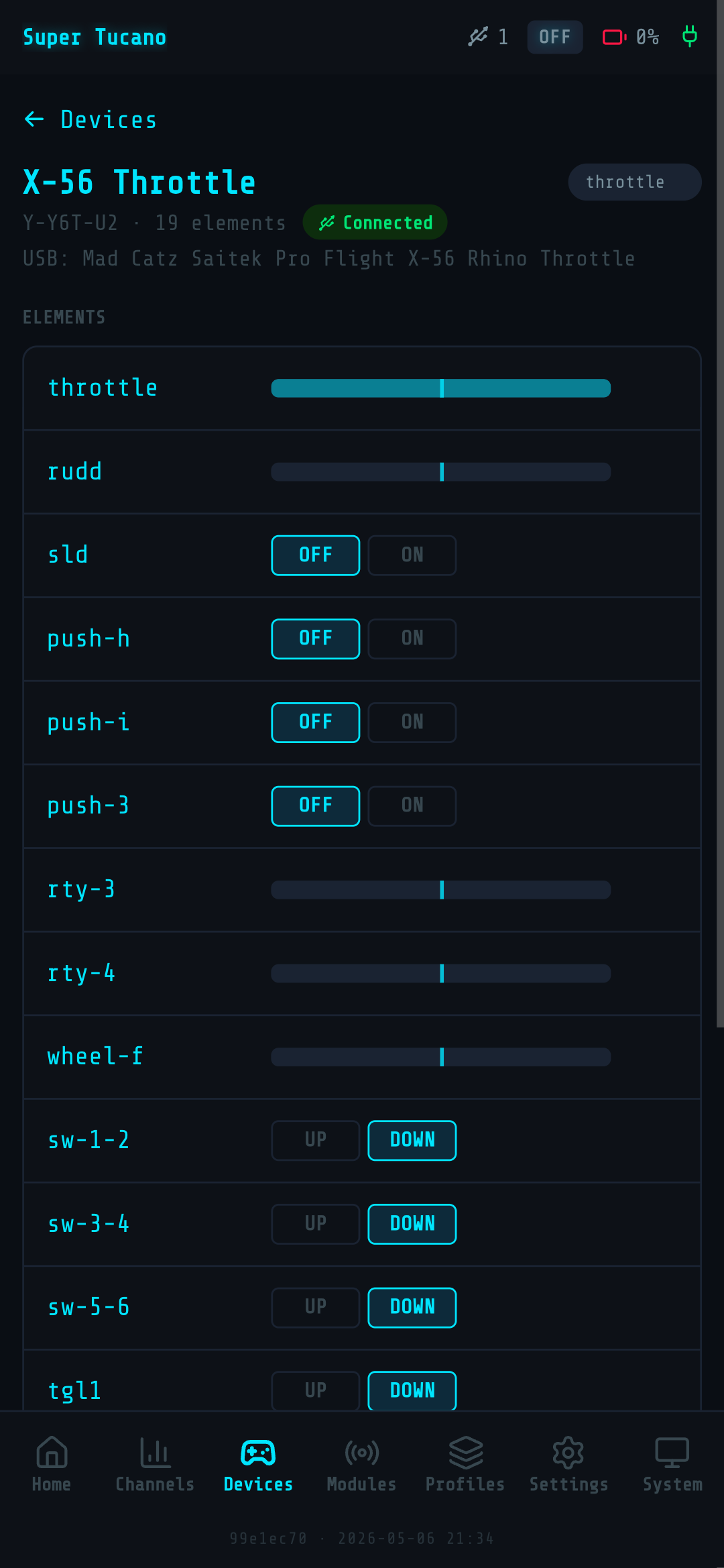
- Check the Web UI. Open Devices — the joystick should be in the list with a Connected badge. Tap on it; the Elements section shows live values. Wiggle the stick and press buttons — sliders and states should move in real time. If it’s listed as Connected and values move, the device is recognized; you just need to bind it. If it’s not in the list at all, it isn’t being detected.
If you’ve tried all that, drop a note on the Facebook group with the device name and what you’ve tried.
Do I need a flight controller to use Magic Box?
Section titled “Do I need a flight controller to use Magic Box?”No. Magic Box drives an RC chain — your TX module → ((RF)) → receiver → model — the same way a regular radio does. What’s at the model end is up to you:
- Classic RC plane, line-of-sight, no FC: receiver wired straight to servos. Most popular setup for warbirds, gliders, club flyers.
- FPV plane or quad with a flight controller: receiver hands channels to the FC (iNav, Betaflight, Ardupilot), the FC drives ESCs / servos / cameras.
- Both at once: some setups split — receiver to FC for stabilisation, FC pass-through to a few extra servos.
Magic Box doesn’t care which one you fly. It replaces the sticks on the radio end of the chain.
Can I use Magic Box with a flight controller?
Section titled “Can I use Magic Box with a flight controller?”Yes. Magic Box’s output (SBUS, IBUS, CRSF or PPM) ends up at the receiver in your model; if there’s an FC behind the receiver, the FC sees those channels exactly like it would from any other radio.
| Flight controller | Tested |
|---|---|
| iNav (Matek, SpeedyBee) | Yes |
| Betaflight | Yes |
| Ardupilot | Reported working |
Does my radio need a trainer port?
Section titled “Does my radio need a trainer port?”Only for the PPM path. If your radio has a UART (most modern radios do) or you’re running a separate radio module that takes SBUS/IBUS/CRSF, you don’t need a trainer port at all.
Can I fly multirotors with Magic Box?
Section titled “Can I fly multirotors with Magic Box?”Yes. Magic Box doesn’t care what the model is — airplane, multirotor, ground vehicle, boat. You wire the channels however your model expects them, set the output protocol your FC or receiver wants, and fly.
What about head trackers?
Section titled “What about head trackers?”Bluetooth head trackers (Head Tracker v2.2 and similar) work as a PPM input that mixes with your HOTAS controls. See Bluetooth head tracker setup for the full walkthrough — find the MAC address, create a Wireless module, bind the axes.
Where do I download firmware?
Section titled “Where do I download firmware?”OS Images lists every version with download links and what changed.
How do I update?
Section titled “How do I update?”Back up from the Web UI, flash the new SD card image with Raspberry Pi Imager, restore your backup. About 15 minutes start to finish — full walkthrough in How to Update.
Did you cover everything?
Section titled “Did you cover everything?”Probably not. If you’ve got a question that should live here, drop us a line and we’ll add it.