
SBUS (digital UART)
SBUS is the digital RC protocol most modern receivers and flight controllers speak. Magic Box outputs it on the UART 3.5 mm jack (and on the dedicated UART pads on the motherboard).
Wire format: inverted UART, 100 kbps, 8E2. Up to 16 channels in one packet, plus a few digital flags (failsafe, frame lost). The widely supported default — if you’re not sure which digital protocol to pick, this is the safe answer.
Pick SBUS when your receiver or flight controller documentation lists “SBUS” as an input. That covers nearly all FrSky, FlySky, RadioMaster, and ExpressLRS receivers when wired to the SBUS pad.
Configure in the Web UI
Section titled “Configure in the Web UI”- Open the Web UI from your phone or laptop.
- Go to Settings → Output protocol.
- Pick SBUS.
- Save. The change applies on next boot.
PPM keeps working at the same time on the PPM jack — you can drive both a digital receiver and a PPM trainer port simultaneously if your setup needs both.
Verify the chain
Section titled “Verify the chain”If your model uses a flight controller (iNav / Betaflight / Ardupilot), the receiver tab is the easiest way to sanity-check the chain. The FC config is the boring default:
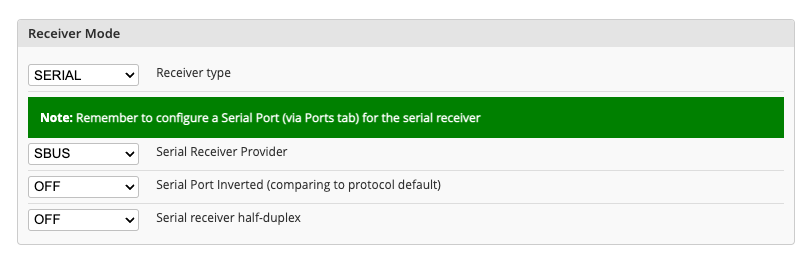
Don’t forget to assign the right UART to “Serial RX” in the Ports tab. After that, the Receiver tab fills in as soon as the radio link is healthy — bars per channel, AETR mapping, RSSI on the channel you’ve configured:
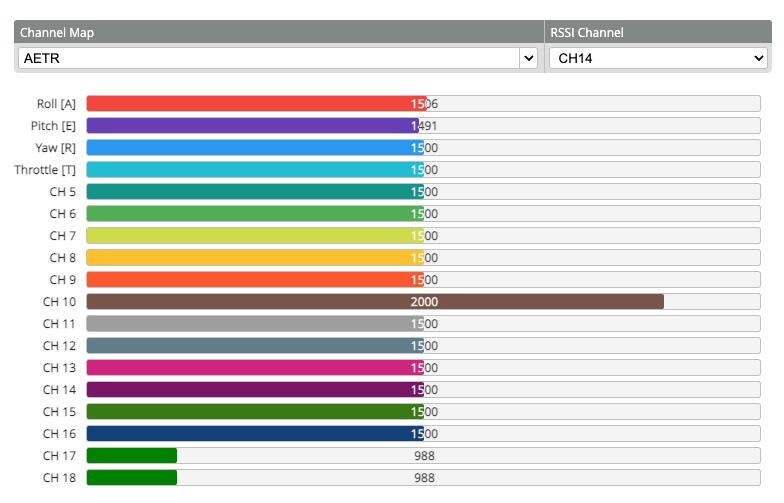
If you don’t have a flight controller, the equivalent sanity-check is plugging the receiver into a servo and watching it move when you push the stick — same signal, different consumer.
Wiring
Section titled “Wiring”See External TX Modules for the stereo cable layout, the UART pad alternative, and power options — the same wiring patterns work for any digital protocol Magic Box outputs.